Windows 10 and 11 · traffic accounting
TrafficMeter
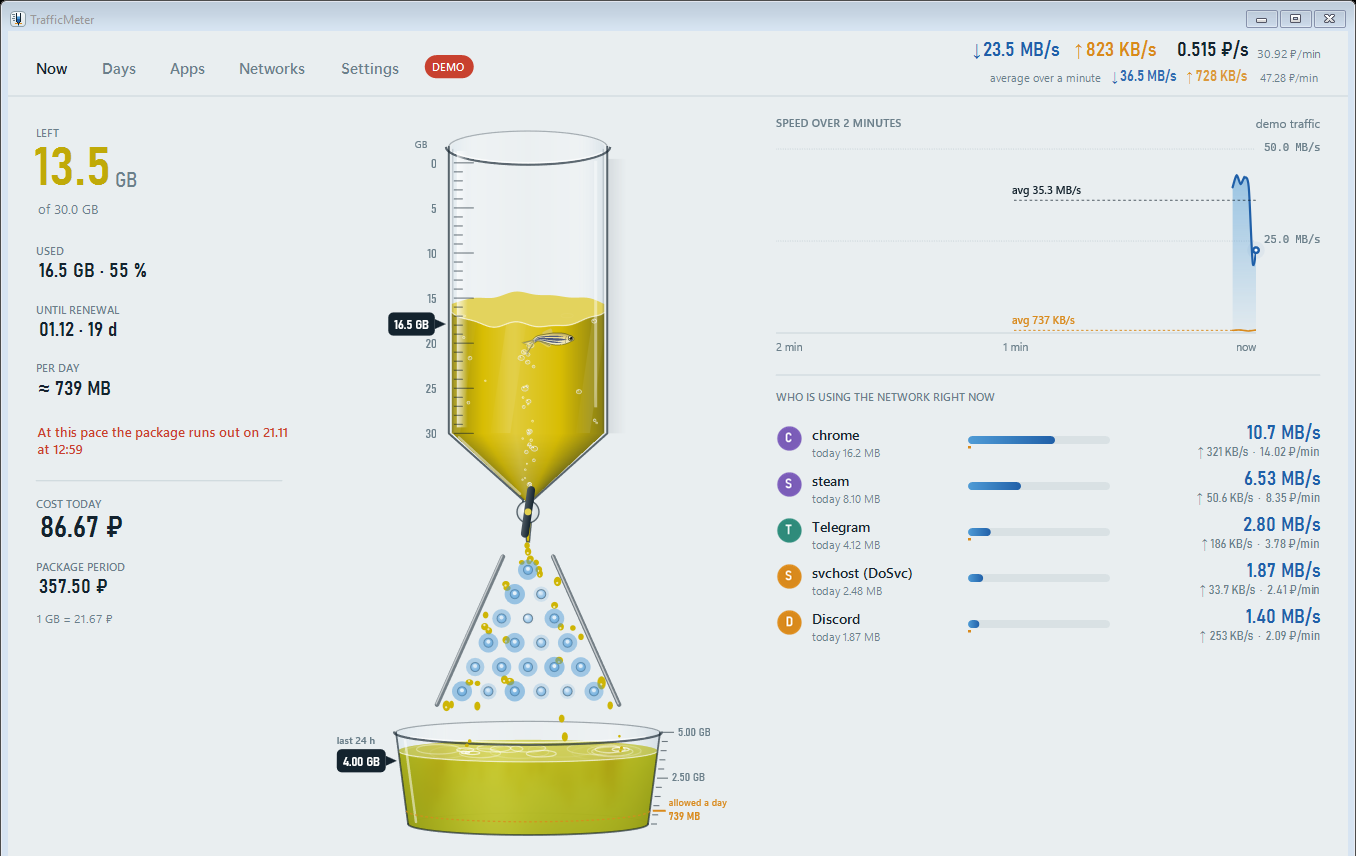
Exact accounting of mobile internet on Windows: how much of the package is left, which program is spending it, and the day it runs out at today's pace.
- Version
- 0.4.2.3
- Size
- 56.9 MB
- System
- Windows 10 and 11, 64-bit
- Published
- SHA-256
3d747b447e4756fcf11fc24d46b11ad2a7c39072212e3dbac142aac5d06b47e9
This is the free version; Pro opens with a license. Nothing to install first: the program brings its own .NET. Windows asks twice, SmartScreen and administrator rights; the guide below shows what to click.
What it measures
Every number comes from the network adapter's own byte counters, not from an estimate.
- The package
- What is left, how much a day you can spend until renewal, and the date it runs out at the current pace. The liquid turns from green to red as the package goes.
- Every program
- Who is downloading right now and how much each program took today, this week or this period, with VPN traffic in its own column.
- Every network
- Wi-Fi, a USB modem and a phone hotspot are counted apart, and you choose which of them belong to the package.
- Every hour
- Days and hours for any period. Pro adds a forecast for today and for the end of the period.
- Warnings
- A note in the tray at 80 and 100 percent. The internet itself is never blocked or slowed down.
- Your data
- The history stays on your computer and exports to CSV. Pro adds the report with charts, JSON and access for AI assistants over MCP.
How to start
Five minutes from the download to the first reading.
Download and run the installer
The installer is one file. If Windows SmartScreen says it protected your PC, choose More info, then Run anyway: the installer is new and the filter does not know it yet.
Allow administrator rights
The counter runs as a Windows service, so it keeps counting with the window closed. Installing a service takes one yes.
Click Install
Leave the defaults: the tray icon at sign-in, the traffic command and a Start menu shortcut. Counting starts as soon as setup finishes.
Set your package
In Settings, enter the package size and the day it renews, and tick the networks that belong to it. If the operator's app shows another figure, enter what is left under Left right now.
Read the burette
The scale reads from the top: the surface points at what is used, and the liquid below it is what is left. Click the tray icon to open the window.
To remove TrafficMeter, open Apps in Windows Settings. The traffic history stays unless you ask to delete it too.
TrafficMeter Pro
The free version counts everything exactly: the package and its warnings, every program and network, CSV. Pro adds what the traffic costs, forecasts, the report with charts and tools for AI assistants. One payment, no subscription: the license covers every 1.x version.
-
Pro for 1 computer
690 ₽490 ₽Launch price. Paid in rubles; a card in another currency is charged at its bank's rate.
-
Pro for 3 computers
1 190 ₽
For example a laptop, a home PC and a work PC at the same time.
By clicking Buy you accept the terms of the license agreement (offer)
Payment is being connected
Card and SBP payments through Robokassa open in the coming days. The free version is on this page now, and the key will reach your email within minutes of paying.
How buying works
From paying to Pro on your computer takes a few minutes.
- Payment
- By a card of a Russian or foreign bank or through SBP, on Robokassa's secure page. Card details are entered only there and never reach us. The receipt comes to your email.
- Getting the key
- The key comes to the email you give at payment as soon as the payment is confirmed, usually within minutes and no later than 24 hours. Delivery is free: it is a key, not a parcel. No email? Check the spam folder and write to us.
- Activation
- In TrafficMeter open Settings, the License card, paste the key and click Activate. The internet is needed only for that moment. To move the license, click Release this computer on the old one.
- Refunds
- Within 14 days of payment we refund the whole amount for any reason: write to us with the order number. The money goes back the way you paid within 10 working days, and the key stops working.
Full terms: License agreement (offer) · [email protected] · +7 (909) 594-39-20